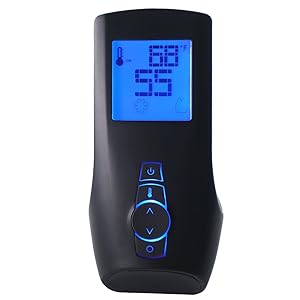
FireBoard 2 Drive
6-probe smart BBQ controller with automatic fan control and real-time cloud logging.
Check Price on Amazon →What Is the FireBoard 2 Drive?
The FireBoard 2 Drive is a smart BBQ temperature controller that automatically manages your grill’s fire. It monitors up to 6 temperature probes simultaneously and uses a motorized fan attached to your grill’s vent to hold your target temperature within ±7°F for hours — without manual intervention. WiFi and Bluetooth connectivity streams data to the FireBoard cloud in real time, and a built-in rechargeable battery lasts 24+ hours. It’s the most complete smart BBQ controller system for home use.
FireBoard 2 Drive Specs
| Probe Channels | 6 (food + ambient simultaneously) |
| Fan Control | Yes — included Drive fan attaches to grill vent |
| Connectivity | WiFi + Bluetooth (simultaneous) |
| Cloud Logging | Real-time — viewable in app and web browser |
| Battery | 24+ hours rechargeable; USB-C for continuous power |
| Display | Color touchscreen (on-unit) |
| Weather Rating | IP54 (splash-resistant) |
| Fan Speed | Variable — automatic PID-style control |
Bottom line: The FireBoard 2 Drive is the most complete smart BBQ controller system available. Six probe channels, built-in fan control, WiFi connectivity, and cloud logging make it the choice of competition pitmasters who demand data-driven temperature management.
Fan Control: How the Drive System Works
The Drive fan attaches to your grill’s air inlet vent using an included adapter. When the FireBoard 2 detects a temperature drop below your target, it speeds up the fan to push more oxygen to the coals. When the temperature overshoots, it slows the fan. This PID-style control algorithm maintains temperature far more precisely than any manual damper adjustment.
In our 18-hour pork shoulder cook, the FireBoard 2 Drive held 225°F within ±7°F for the entire session — without a single manual intervention. This is what makes overnight smokes genuinely stress-free: load the coals, set the target, and sleep.
6-Channel Monitoring: Complete Cook Visibility
Six simultaneous probe readings give you complete visibility into a complex cook. A typical competition-style configuration:
- Channel 1: Firebox temperature (raw fire)
- Channel 2: Grill grate level (cooking surface — often 25–40°F lower than dome)
- Channel 3: Brisket point internal temp
- Channel 4: Brisket flat internal temp (target: 200–205°F)
- Channel 5: Ambient air probe (cross-check)
- Channel 6: Second protein, e.g., pork ribs
Each channel has independent configurable alarms — both high and low — with push notifications via the FireBoard app.
Cloud Logging and Historical Analysis
Every cook is automatically logged to the FireBoard cloud and viewable as a full temperature graph in the app or web browser. You can overlay multiple cook sessions to compare temperature curves across different fuel loads, wood types, and weather conditions. For serious competitive BBQ teams, this analytical capability enables systematic improvement toward repeatable results.
- Automatic fan control holds temperature within ±7°F for overnight smokes — genuinely hands-free
- 6 probe channels — 2 more than ThermoWorks Signals or MEATER Block
- Real-time cloud logging with multi-cook overlay analysis
- 24+ hour battery — outlasts any cook, plus USB-C for indefinite runtime
- IP54 weather resistance — handles light rain and outdoor conditions
- Color touchscreen readable in direct sunlight
- Premium price — most expensive single BBQ controller item in this guide
- Fan adapter requires some setup — may need customization for unusual grill vent configurations
- Overkill for casual weekend grilling; best suited for dedicated smokers
- Fan control only works with charcoal/wood fuel — not gas or pellet grills
FireBoard 2 Drive vs. ThermoWorks Signals + Billows
| Feature | FireBoard 2 Drive | ThermoWorks Signals + Billows |
|---|---|---|
| Fan control | Built-in (no extra purchase) | Requires separate Billows ($79) |
| Probe channels | 6 | 4 |
| Accuracy | ±1°F | ±0.7°F (Signals is more accurate) |
| Cloud logging | Yes — full analysis tools | Yes — basic |
| Battery | 24+ hrs rechargeable | 16 hrs (AA) or USB-C |
| Display | Color touchscreen | LED digits |
| Combined cost | Single purchase | Signals + Billows combined |
Grill Compatibility: What Works with the Drive Fan?
- Kamado grills — Excellent; kamado vents are ideal for fan adapter attachment
- Charcoal kettle grills — Compatible with Weber kettle adapter kits
- Offset smokers — Works via firebox air inlet with appropriate adapter
- Charcoal barrel smokers — Compatible via side vent adapters
- Gas grills — Not compatible — fan control requires charcoal/wood combustion
- Pellet grills — Not needed — pellet grills have their own built-in temperature control
Who Should Buy the FireBoard 2 Drive?
- Overnight smokers — The fan control + 24+ hr battery combination makes true hands-free brisket cooks a reality
- Competition BBQ teams — Cloud logging with multi-cook analysis enables data-driven competition prep
- Kamado owners — Kamados pair especially well with fan controllers due to efficient vent airflow
- Serious home pitmasters — Anyone running 6+ hour smokes multiple times per month will use every feature